Technical Architecture
This section is the architecture entry point for the XR viewer.
Use the linked sections below to navigate the implementation details:
- Glossary
- Contributor Onboarding
- Runtime Subsystems
- Scene and Runtime Flows
- VRDF
- Rendering Pipeline
- Backend Integration and Contracts
- Platform, Build, and Security
- Performance, Testing, and Risks
- Extension Guide and Ownership
Purpose and Scope
This document describes the current technical architecture of the CASSANDRA XR Unity project as implemented in the repository.
The goal is to document:
- The runtime architecture
- The role of the main subsystems
- How data moves from backend services into the Unity scene
- How volumetric medical data is loaded and rendered
- How voice, AI, UI, and XR features interact
- How the project is configured for Quest and desktop targets
- The current technical constraints, assumptions, and risks
This is an implementation-oriented document. It describes what the codebase currently does, not only what the product is intended to do.
High-Level System Overview
CASSANDRA XR is a Unity-based XR client for interactive exploration of medical volume data in mixed reality and desktop contexts.
At runtime, the application performs five primary jobs:
- Fetches the active study and asset metadata from a backend REST API
- Downloads and caches
.vrdfvolumetric datasets locally - Decodes those datasets into Unity
Texture3Dresources - Renders the volume through custom URP raymarching shaders
- Exposes the study through immersive UI, report viewing, and a voice/AI assistant
The system is scene-driven. Most application logic is attached to MonoBehaviour components placed in MainScene and connected through serialized inspector references.
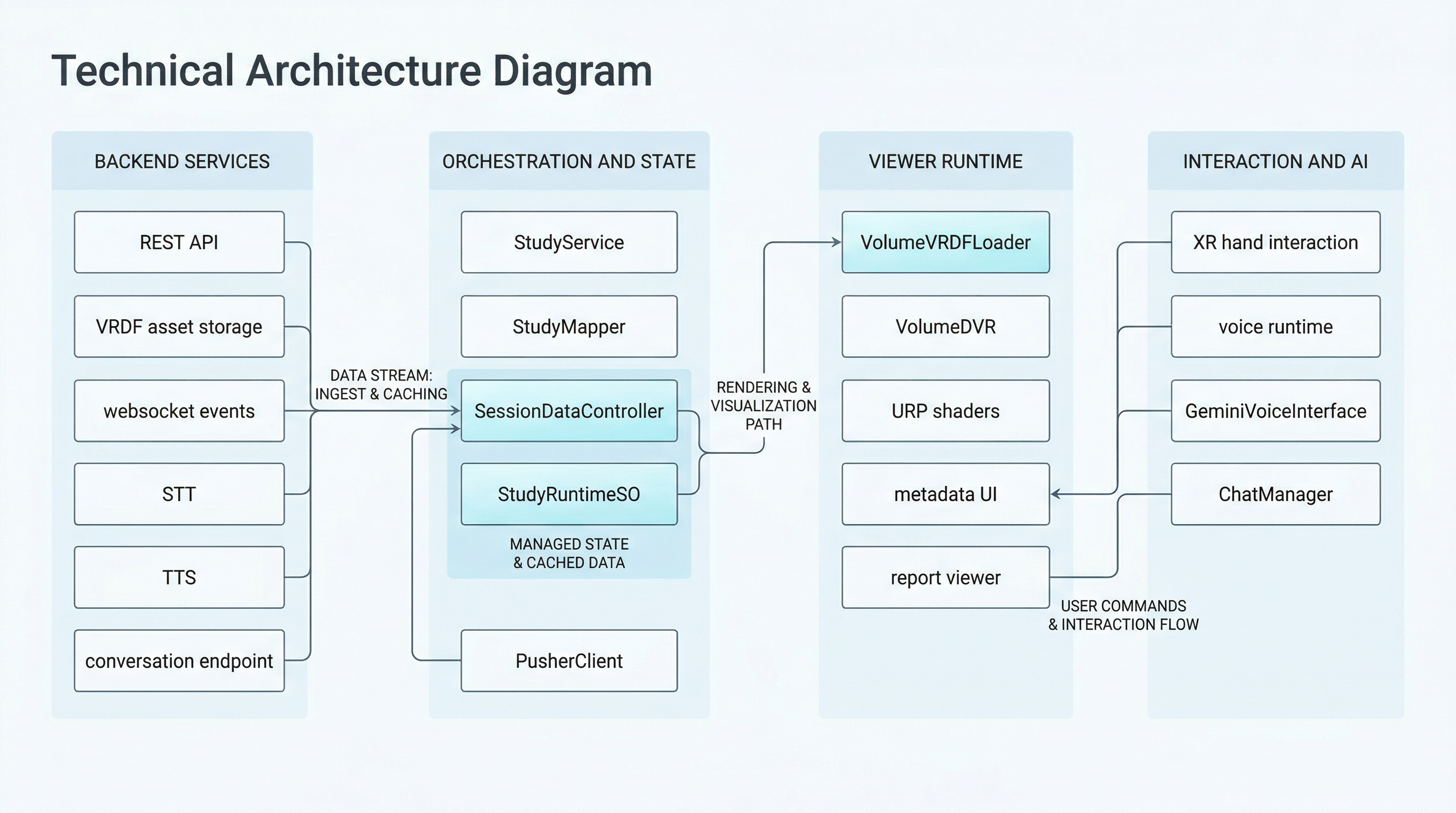
System overview of the CASSANDRA XR runtime, including the backend boundary, viewer subsystems, and scene-level coordination path.
System Map
The simplified map below shows the main runtime slice and the secondary voice/AI slice:
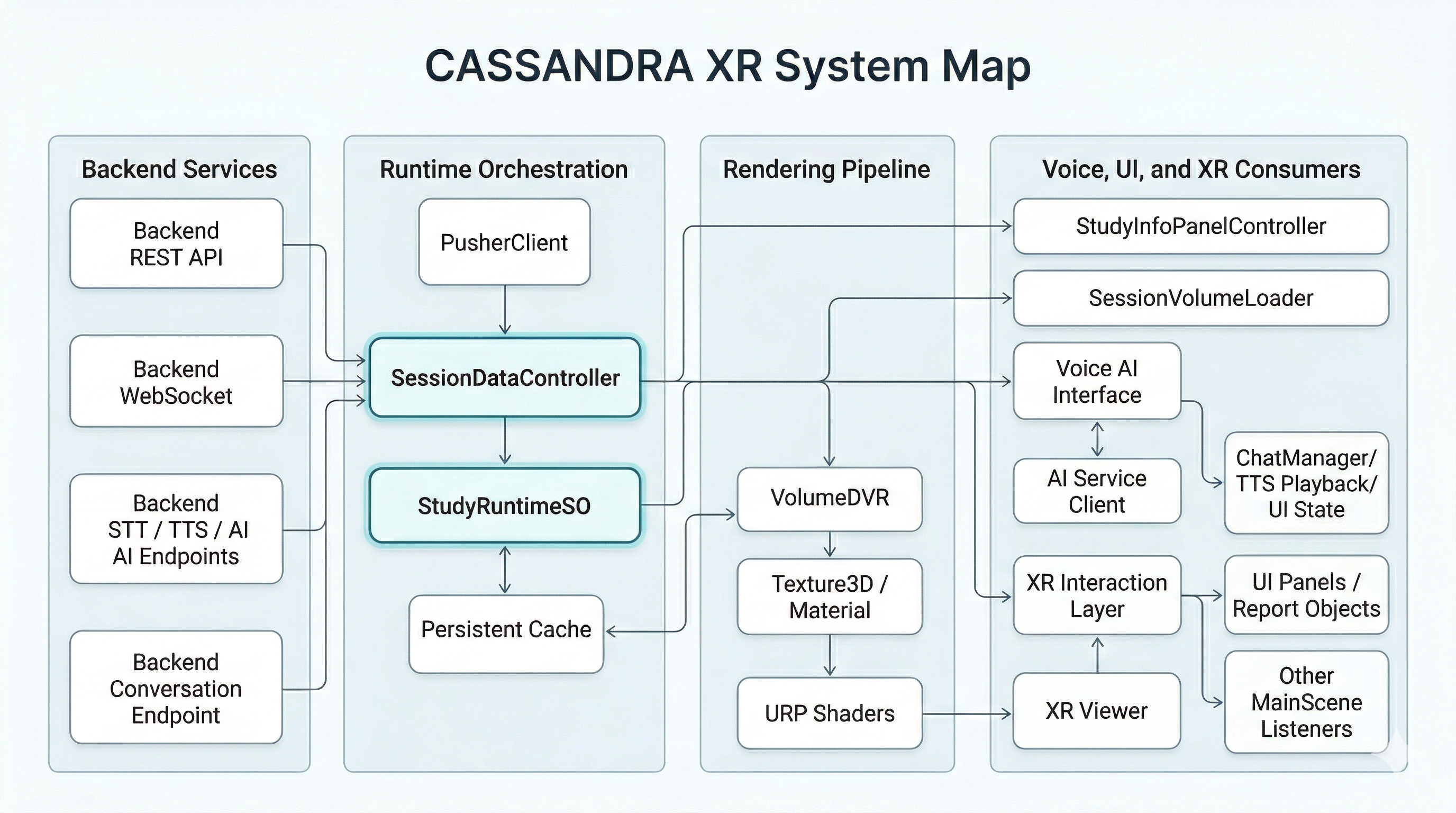
High-level system map showing backend services, runtime orchestration, rendering flow, and the voice/UI/XR consumers around the active study state.
Technology Stack
Engine and Core Runtime
- Unity Editor version:
6000.2.6f2 - Render pipeline: Universal Render Pipeline (URP)
- Scripting runtime: C# /
Assembly-CSharp - Input system: Unity Input System
- XR framework:
com.unity.xr.managementcom.unity.xr.openxrcom.unity.xr.meta-openxrcom.unity.xr.handscom.unity.xr.interaction.toolkit- Meta XR SDK Core
Networking and Serialization
- REST:
UnityWebRequest - WebSocket:
websocket-sharp.dll - JSON:
Newtonsoft.Jsonfor backend payloads and websocket framesJsonUtilityfor local simple payload parsing
Voice and AI
- Wake word: Picovoice Porcupine
- STT and TTS: external backend endpoints provided dynamically by backend configuration
- Conversational assistant: Gemini-compatible backend endpoint provided per study
Volume Rendering
- Custom
.vrdfbinary container format - Runtime conversion to
Texture3D - Custom HLSL URP shaders:
Assets/Shaders/VolumeDVR_URP.shaderAssets/Shaders/VolumeDVR_URP_Quest.shader
Related Repositories and Technical Lineage
The public technical context around this repository is split across three GitHub projects:
- CASSANDRA XR
- the main application repository documented here
- VRDF SDK
- the companion repository for the
.vrdfvolume container, its export modes, and cross-platform tooling
- the companion repository for the
- HybridMedRenderer
- a related prototype and research-oriented renderer that explored hybrid surface and volume rendering with VRDF support
This documentation focuses on the code shipped in this repository. The VRDF SDK is the public companion reference for the format itself, while HybridMedRenderer provides useful background on the renderer lineage that informed the current viewer.
Repository Layout
The repository contains both product code and a significant amount of imported Unity sample/package content.
Primary Product Code
Assets/Scripts/APIAssets/Scripts/ChatbotAssets/Scripts/DVRAssets/Scripts/InteractionAssets/Scripts/UIAssets/Scripts/VRDFAssets/Scripts/XRAssets/ShadersAssets/Scenes/MainScene.unityAssets/SettingsAssets/Plugins/AndroidAssets/android_config
External or Imported Content
Assets/SamplesAssets/Porcupinepartly third-partyAssets/TextMesh Pro- XR Interaction Toolkit sample assets
- XR Hands sample assets
Assembly Organization
There are no custom asmdef files for the application code under Assets/Scripts.
As a result:
- Most custom code compiles together into
Assembly-CSharp - There is no hard compile-time separation between modules
- Boundaries are architectural conventions rather than enforced code boundaries
Architectural Style
The application follows a Unity-native, scene-composed architecture:
MonoBehaviourcomponents own most runtime behavior- A
ScriptableObjectis used as the main shared runtime state container - Event callbacks and serialized references are the primary coordination mechanisms
- A small number of static properties are used for shared configuration values
- Platform and build behavior is partly encoded in Unity assets and partly in editor scripts
This is not a layered enterprise architecture with strict dependency inversion. It is better understood as a feature-oriented Unity app with a few key vertical slices:
- Study acquisition and synchronization
- Volume load and rendering
- Voice and AI interaction
- Metadata and report display
- XR and UI interactions