VRDF
This page documents how the CASSANDRA XR viewer uses the .vrdf volume container at runtime.
For the public companion repository that defines the broader format surface and tooling, see:
Purpose
In this project, VRDF is the handoff format between backend-delivered study assets and the Unity rendering runtime.
It packages:
- voxel data
- metadata
- transfer-function data
into a single binary file that can be cached locally, decoded in Unity, and converted into GPU resources without requiring separate sidecar files.
Why The Viewer Uses VRDF
The current runtime expects medical volumes to arrive as .vrdf assets because the format keeps the viewer-side load path narrow:
- one file per volume artifact
- explicit dimensions and spacing
- embedded transfer-function information
- enough mode information to decide how to construct Unity textures
That design is consistent with the current SessionDataController -> VolumeDVR pipeline, where the backend exposes assets, the client downloads them as files, and the renderer reloads from local cache.
Runtime Ownership
The VRDF path in this repository is primarily implemented by:
Assets/Scripts/VRDF/VolumeVRDFLoader.csAssets/Scripts/DVR/VolumeDVR.cs
SessionDataController is responsible for acquiring the files. VRDFLoader parses and converts them. VolumeDVR decides how to bind the decoded result into the active material and viewer object.
Binary Layout Used By The Loader
VRDFLoader.LoadFromFile() expects the following high-level layout:
- 8-byte magic header:
VRDF0001 - total file size
- metadata JSON block
- transfer-function JSON block
- raw voxel block
The loader reads each block in little-endian order and then dispatches parsing based on the metadata fields.
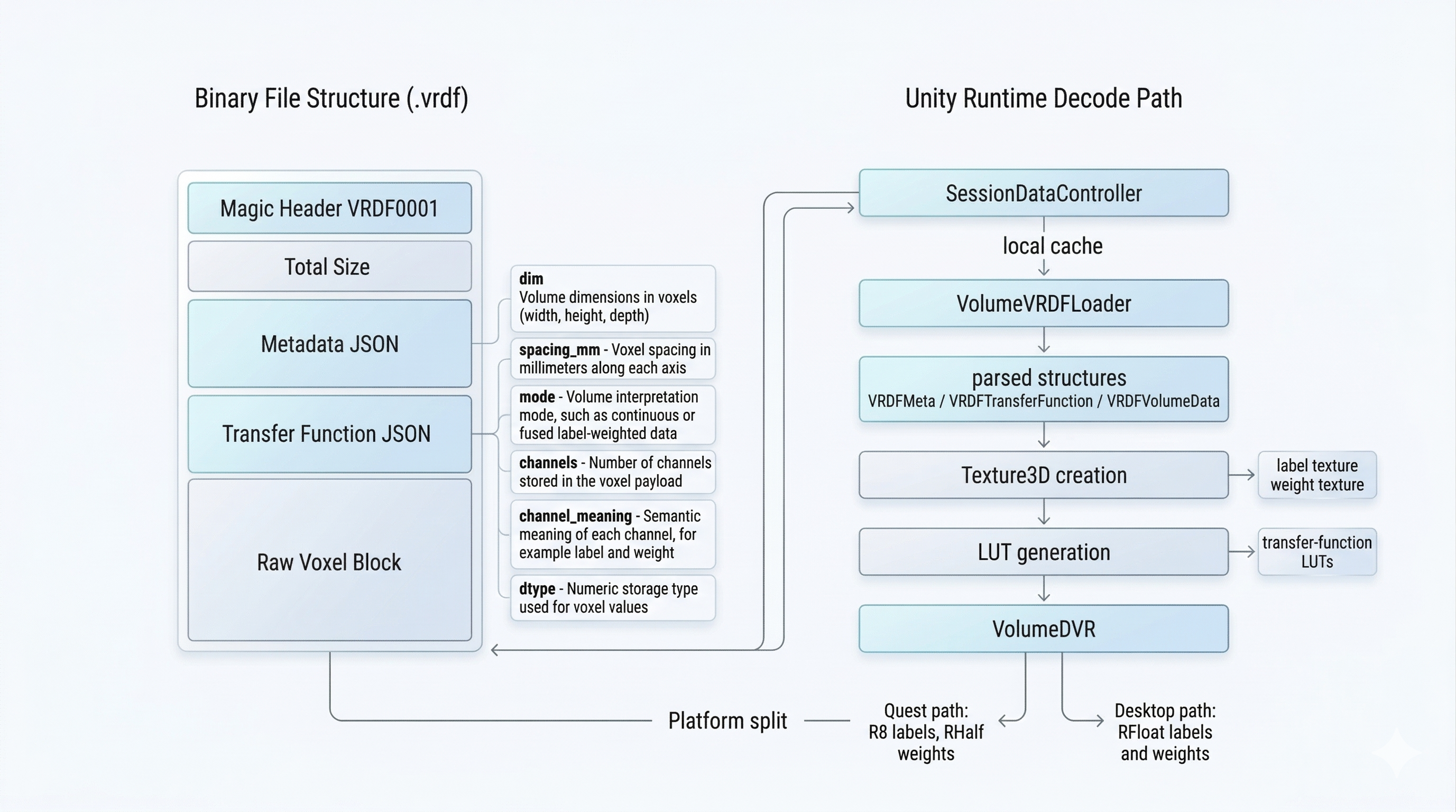
VRDF container structure and the decode handoff from file blocks into the Unity runtime texture-building path.
Metadata Model
The parsed metadata model in this repository is represented by VRDFMeta.
The most important fields for the viewer are:
dimspacing_mmdtypeintensity_rangeaffinemodechannelschannel_meaning
dim and spacing_mm determine object scale and texture dimensions. mode and channels decide which runtime path the loader uses. channel_meaning is especially important for fused label-and-weight files.
Transfer Function Model
The parsed transfer-function model is represented by VRDFTransferFunction.
The loader currently expects two main families:
labelmapcontinuous
For label maps, the runtime consumes a list of per-label entries with:
- label index
- display name
- RGB color
- alpha
For continuous data, the runtime consumes a curve definition that can be baked into a lookup texture.
Supported Runtime Modes
The codebase currently handles two main categories:
- legacy single-channel continuous volumes
- fused
anatomy_label_weightedvolumes with two channels
For fused files, the raw block is interpreted as interleaved float32 pairs:
- label
- weight
The loader splits those into two separate CPU arrays before texture creation.
Unity Texture Construction
After parsing, VRDFLoader.BuildUnityTextures() converts the decoded payload into Unity resources.
Quest / Android Path
On Quest, the runtime uses mobile-oriented formats:
- labels:
TextureFormat.R8 - weights:
TextureFormat.RHalf - legacy continuous data:
TextureFormat.RHalf
This reduces memory and bandwidth pressure, at the cost of precision compared with the desktop path.
Desktop / Editor Path
On desktop and in the editor, the runtime keeps a higher-precision path:
- labels:
TextureFormat.RFloat - weights:
TextureFormat.RFloat - continuous data:
TextureFormat.RFloat
This keeps the implementation simpler and is more tolerant of debugging and inspection workflows.
Transfer-Function Textures
The loader generates runtime lookup textures from the embedded transfer-function definition.
The main outputs are:
tfLUTTextureSofttfLUTTextureHard
The renderer can then switch between softer interpolated visualization and harder segmentation-style visualization without reparsing the source file.
VRDF In The Viewer Pipeline
At a high level, the VRDF path in the viewer is:
- the REST study payload is mapped into viewer-friendly asset metadata
StudyMapperidentifies VRDF-like assets and modality associationsSessionDataControllerdownloads.vrdffiles into persistent cacheVolumeDVRselects the requested modality fileVRDFLoaderparses the container and builds the correspondingTexture3DresourcesVolumeDVRbinds textures and LUTs to the material- the active shader raymarches the decoded volume
Naming Expectations In This Repository
The current runtime expects modality-oriented filenames, especially in VolumeDVR.LoadVolumeByCodeAsync().
The strict path tries:
{code}_lw.vrdf
Then the loader falls back to cache and StreamingAssets scans using substring matching.
This means backend naming conventions and client modality names are tightly coupled. If the backend starts exposing new filename conventions, StudyMapper and the load strategy need to stay aligned.
Important Constraints
- The file is read fully into memory before parsing.
- Fused label-weight files are unpacked on the CPU.
- Reloading replaces previously bound textures rather than streaming incrementally.
- Android uses more aggressive cleanup because modality swaps can otherwise leave memory pressure behind.
These constraints are one of the main reasons modality reloads are more fragile on Quest than on desktop.
Relationship To The VRDF SDK Repository
The CASSANDRA XR repository is not the canonical public format specification. It contains the viewer-side runtime that consumes the format.
The VRDF SDK is the better public reference for:
- format intent
- export modes
- Python-side encoding
- broader cross-platform format tooling
This page documents the narrower question: how the Unity viewer in this repository consumes VRDF at runtime.