Scene and Runtime Flows
MainScene Composition
Assets/Scenes/MainScene.unity is the primary runtime scene.
Based on the serialized scene wiring, the key active objects include:
WebsocketManagerPusherClient
StartupManagerStudyServiceSessionVolumeLoaderSessionDataController
DVRVolumeVolumeDVR
- Dropdown and loading UI
DropdownVolumeLoaderModernProgressBarProgressPanelAnimator
- Chat and voice
ChatManagerPorcupineWakeWordListenerGeminiVoiceInterfaceMicButtonPulse
- Metadata
StudyInfoPanelControllerFaceUser
- Report object
PageDisplayReportGrabAndSwipe
- XR and platform support
XR Origin (Mobile AR)AR SessionForceFFRPermissionsCheck
The scene therefore combines:
- startup orchestration
- networking
- volume visualization
- voice/AI interaction
- metadata display
- report display
- platform-specific XR support
in a single scene composition.
End-to-End Runtime Sequences
The sequence diagram below summarizes the three most important runtime paths:
- Initial startup: scene bootstrap, study fetch, cache download, first volume load, and UI reveal
- Websocket-triggered reload: backend state change, main-thread dispatch, reload request, and modality refresh
- Voice interaction: user or wake-word trigger, recording, transcription, conversational request, response playback, and chat update
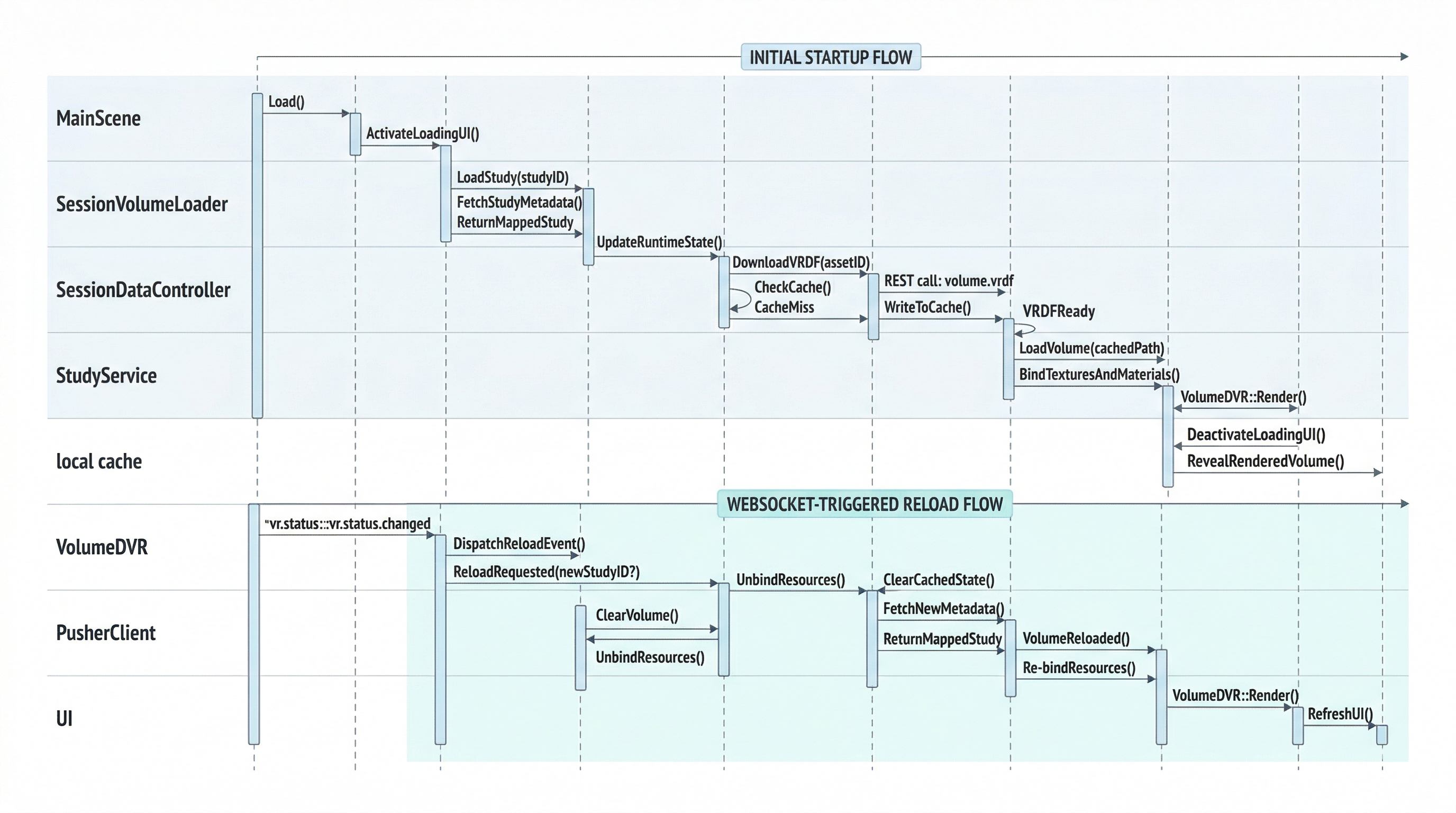
Startup, reload, and interaction flow across the scene bootstrap, websocket updates, and voice runtime.
Initial Startup Sequence
MainSceneloadsPusherClientstarts and attempts websocket connectionSessionVolumeLoader.Start()shows loading UI and callsSessionDataController.BeginLoad()SessionDataControllercallsStudyService.FetchStudies()- REST payload is mapped into
StudyForUnity - Backend config values are published:
- Picovoice access key
- STT URL
- TTS URL
StudyRuntimeSOis updated with the active study- All VRDF assets are downloaded into persistent storage
SessionVolumeLoadercallsVolumeDVR.LoadVolumeByCodeAsync()VolumeDVRdecodes the selected modality file- Textures and LUTs are bound to the material
- The placeholder brain crossfades into the rendered volume
- Loading UI is faded out
Websocket Reload Sequence
- Backend sends
vr.status.changed PusherClientparses payload and enqueues itPusherClient.Update()dispatches the payload on the main threadSessionDataController.HandleVrStatusChanged()compares current study state- If study code or VR mode changed:
StudyRuntimeSO.Clear()OnReloadRequestedemitted
SessionVolumeLoaderreceives the reload event- Visuals reset and a new load pipeline starts
Modality Change Sequence
- User changes dropdown selection
DropdownVolumeLoaderstarts a transition coroutine- Progress panel and placeholder are shown
- Selected modality code is converted to
{code}_lw.vrdf VolumeDVR.LoadVolumeByCodeAsync()loads the new cached volume- New textures are bound to the material
- Placeholder crossfades to the new volume
- Progress panel fades out
Voice Interaction Sequence
- Wake word or input action starts listening
GeminiVoiceInterface.StartRecording()begins microphone capture- Silence detector auto-stops after inactivity
WavUtilityconverts the clip to WAV bytes- STT endpoint returns transcription text
GeminiClient.SendPrompt()posts the prompt to the active conversation endpoint- Chat UI shows typing placeholders during processing
- Response is parsed and rendered in the chat window
- TTS endpoint is called and audio chunks are played back
Data and Event Model
Core Runtime Events
SessionDataController:
OnAccessKeyReadyOnReloadRequestedOnStudiesReadyOnDownloadProgressOnDownloadCompletedOnError
PusherClient:
OnVrStatusChanged
StudyRuntimeSO:
OnChanged
GeminiVoiceInterface:
OnStartListeningOnStopListening
Runtime State Ownership
- Active study metadata:
StudyRuntimeSO - Downloaded volume cache:
Application.persistentDataPath - Active volume textures:
VolumeDVR - Active chat display/history:
ChatManager - Active voice configuration:
SessionDataControllerstatic properties