Runtime Subsystems
Main Runtime Subsystems
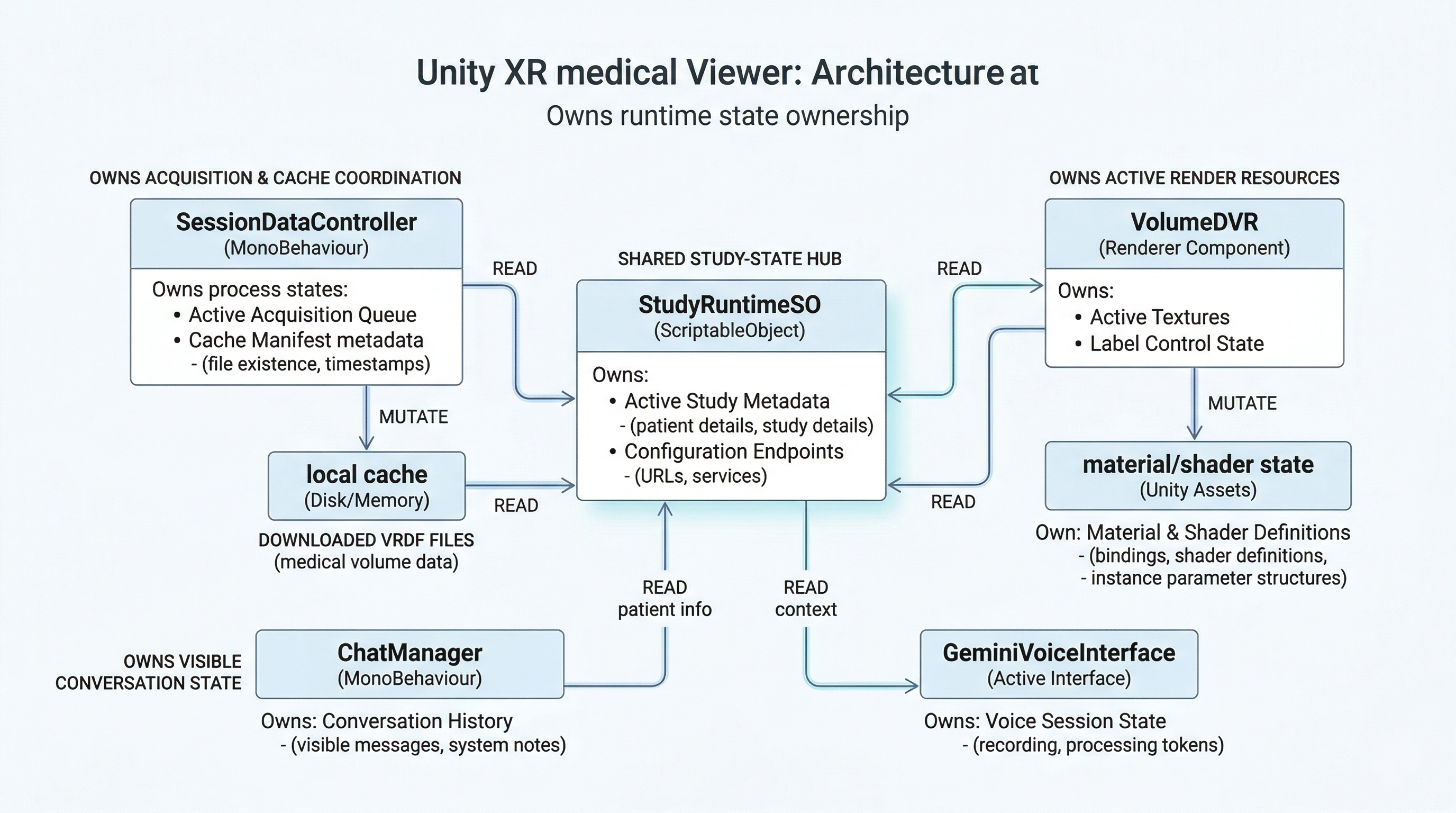
Runtime ownership map showing which objects hold study state, cache state, render state, and scene-facing coordination responsibilities.
Study Acquisition and Session Orchestration
This subsystem is responsible for discovering the current study, publishing runtime state, downloading volume assets, and reacting to backend state changes.
Main Components
Assets/Scripts/API/Ochestrator/StudyService.csAssets/Scripts/API/DataContract/JsonFormatUtility.csAssets/Scripts/API/DataContract/StudyMapper.csAssets/Scripts/API/DataContract/UnityFormatUtility.csAssets/Scripts/API/Ochestrator/SessionDataController.csAssets/Scripts/API/StudyRuntimeSO.cs
StudyService
StudyService is the REST entry point.
Responsibilities:
- Performs
GET https://holonauts.fr/active - Deserializes the backend payload into
RootResponse - Maps
StudyRawobjects intoStudyForUnity - Extracts dynamic backend configuration:
- Picovoice access key
- STT endpoint
- TTS endpoint
JSON Data Contracts
JsonFormatUtility.cs defines the transport-layer structures returned by the backend:
RootResponseStudyRawAssetRawPatientRaw
UnityFormatUtility.cs defines the app-facing in-memory model:
StudyForUnityPatientInfoVrdfAsset
StudyMapper
StudyMapper converts backend DTOs into Unity-oriented runtime models.
Important behavior:
- Filters study assets to only retain VRDF-like assets
- Uses file extension and
asset_typesuffix checks to identify valid volume files - Derives modality names from either
asset_typeor filename patterns
This mapper is the bridge between backend naming conventions and the modality codes used by the volume loader.
StudyRuntimeSO
StudyRuntimeSO is the central runtime state store for the active study.
Responsibilities:
- Stores active study identity and metadata
- Stores patient identity and demographics
- Stores the list of available VRDF assets
- Publishes an
OnChangedevent when study state changes - Provides helper methods:
- patient full name
- patient age estimation
- modality lookup
- date parsing helpers
This object is the primary read model for UI and voice subsystems.
SessionDataController
SessionDataController orchestrates the study/session pipeline.
Responsibilities:
- Initializes the cache path
- Subscribes to
PusherClient - Starts the study fetch pipeline
- Updates static configuration values for voice services
- Applies active study data into
StudyRuntimeSO - Downloads all
.vrdfassets to persistent storage - Emits runtime events for the rest of the scene
Published events:
OnAccessKeyReadyOnReloadRequestedOnStudiesReadyOnDownloadProgressOnDownloadCompletedOnError
This is one of the most important classes in the codebase. It acts as the runtime coordinator between backend state, local cache, and downstream consumers.
Real-Time Synchronization
The app includes a websocket listener to react to backend session state changes.
Main Component
Assets/Scripts/API/Websocket/PusherClient.cs
PusherClient
PusherClient is a long-lived singleton websocket client built on top of websocket-sharp.
Responsibilities:
- Connects to the configured websocket endpoint
- Subscribes to the
vr-statuschannel - Handles reconnect attempts and basic connection health checking
- Parses Pusher-style frames
- Queues study status changes from websocket worker callbacks
- Dispatches them on the Unity main thread
Key event:
OnVrStatusChanged
Threading Model
Websocket callbacks occur off the Unity main thread.
PusherClient therefore:
- Parses frames in worker callbacks
- Enqueues
VrStatusPayloadobjects into a synchronized queue - Dequeues and dispatches them in
Update()
This is an appropriate Unity pattern and avoids illegal direct scene access from background threads.
Interaction with SessionDataController
SessionDataController listens to OnVrStatusChanged.
When the study code or VR mode changes:
- It clears the current
StudyRuntimeSO - It emits
OnReloadRequested - It expects the session startup loader to begin the load pipeline again
Volume Data Format and Decoding
The project uses a custom binary file format called VRDF.
A public companion repository exists for the format itself:
That repository documents the binary layout, export modes, Python-side encoding, and a reference Unity runtime around .vrdf assets.
Main Component
Assets/Scripts/VRDF/VolumeVRDFLoader.cs
VRDF File Structure
The loader expects the following binary layout:
- Magic header:
VRDF0001 - Total size
- Metadata JSON block
- Transfer function JSON block
- Raw voxel block
Supported Data Modes
The loader currently supports:
- Legacy single-channel continuous volumes
- Fused
anatomy_label_weightedvolumes with two channels:- label channel
- weight channel
Parsed Runtime Structures
VRDFMetaVRDFTransferFunctionVRDFVolumeData
Texture Construction Strategy
The loader uses platform-specific texture formats:
Android / Quest
- Labels:
TextureFormat.R8 - Weights:
TextureFormat.RHalf - Continuous data:
TextureFormat.RHalf
Desktop / Editor
- Labels:
TextureFormat.RFloat - Weights:
TextureFormat.RFloat - Continuous data:
TextureFormat.RFloat
Transfer Functions
The loader can generate:
- Soft LUTs for interpolated label rendering
- Hard LUTs for segmentation-like rendering
- Continuous LUTs for scalar data
For label maps, it builds both:
tfLUTTextureSofttfLUTTextureHard
This is a practical design because the render controller can switch display mode without having to reparse the VRDF file.
Volume Rendering and Material Control
This subsystem controls the actual volumetric render object.
Main Components
Assets/Scripts/DVR/VolumeDVR.csAssets/Shaders/VolumeDVR_URP.shaderAssets/Shaders/VolumeDVR_URP_Quest.shader
VolumeDVR
VolumeDVR is the runtime renderer/controller for the active medical volume.
Responsibilities:
- Chooses the correct shader for desktop or Quest
- Loads the active modality file from cache or
StreamingAssets - Invokes VRDF decoding and texture construction
- Binds textures and transfer functions to the material
- Creates per-label UI metadata from transfer function entries
- Maintains a label control texture for runtime visibility toggles
- Rescales the volume object using physical spacing from metadata
- Updates density compensation and scale parameters based on world scale
Runtime Load Strategy
LoadVolumeByCodeAsync(code):
- Derives filename pattern:
{code}_lw.vrdf - Checks
Application.persistentDataPathfirst - Falls back to
StreamingAssets - Falls back to scanning
.vrdffiles by code substring - Calls
InternalLoadFused() - Applies textures and metadata through
ApplyAfterLoad()
Label Control Mechanism
Visibility of segmented labels is controlled through a 2D control texture:
_LabelCtrlTex
Each label index maps to one pixel. The alpha channel of that pixel controls label visibility or opacity.
This design lets the menu/UI update segmentation visibility without rebuilding the 3D volume data.
World Scaling
FitVolumeScaleFromSpacing() derives the object scale from:
- voxel dimensions
- spacing in millimeters
The object is scaled in meters and rotated to a fixed orientation.
Resource Lifecycle
Before loading a new volume, CleanupPreviousTextures():
- Unbinds textures from the material
- Destroys old
Texture3DandTexture2Dresources - Clears label control state
- On Android, triggers aggressive cleanup via:
Resources.UnloadUnusedAssets()GC.Collect()
This explains why reload hitches can occur on constrained mobile hardware.
Shader Architecture
The project maintains two main volume shaders.
Desktop Shader
Assets/Shaders/VolumeDVR_URP.shader
Characteristics:
- Transparent raymarch pass
- Box intersection in object space
- Label or continuous transfer function sampling
- Optional weight volume usage
- Gradient-based normal estimation from label volume
- Lambert-style lighting accumulation
Quest Shader
Assets/Shaders/VolumeDVR_URP_Quest.shader
Characteristics:
- Mobile-oriented raymarching path
- Reduced sample count model
- R8 labels plus half-float weights
- Coarse-step skip behavior for empty regions
- Lighting from up to three directional contributions
- Density compensation tied to world scale
- Debug keyword support
Render Tradeoff
The Quest shader is clearly optimized for mobile constraints rather than visual completeness. That is consistent with the project goal and with the known performance issues around reload and modality switching.
Renderer Lineage
The renderer shipped in CASSANDRA XR is centered on the viewer runtime contained in this repository:
VolumeDVRVolumeVRDFLoaderVolumeDVR_URP.shaderVolumeDVR_URP_Quest.shader
Related public context:
- VRDF SDK
- documents the
.vrdfdata path and reference runtime assumptions
- documents the
- HybridMedRenderer
- an earlier prototype that explored hybrid surface-plus-volume rendering, VRDF support, and immersive visualization workflows
The current CASSANDRA XR repository documents and ships the viewer-focused direct volume-rendering path used by the application.
Startup, Progress, and Volume Reveal
This subsystem controls startup orchestration and load UX.
Main Components
Assets/Scripts/API/Ochestrator/SessionVolumeLoader.csAssets/Scripts/UI/DropdownModularity/DropdownVolumeLoader.csAssets/Scripts/UI/Download/ModernProgressBar.csAssets/Scripts/UI/Download/ProgressPanelAnimator.cs
SessionVolumeLoader
This is the startup scene controller for the initial session load.
Responsibilities:
- Validates inspector references
- Shows the progress panel
- Displays a placeholder brain mesh
- Starts the
SessionDataControllerpipeline - Reacts to download completion
- Invokes
VolumeDVR.LoadVolumeByCodeAsync() - Crossfades from placeholder brain to rendered volume
- Hides the loading panel after reveal
DropdownVolumeLoader
This is the modality switch controller used after startup.
Responsibilities:
- Listens to dropdown changes
- Shows a fake progress phase for UX continuity
- Loads the newly selected modality
- Reuses the same reveal and panel fade pattern
ModernProgressBar
Responsibilities:
- Smoothly interpolates fill amount with
SmoothDamp - Displays progress text
- Acts only as a visual presentation layer
ProgressPanelAnimator
Responsibilities:
- Performs fade-out and shrink animation
- Can reset the panel before the next load
Voice, AI, and Conversation Runtime
This is one of the largest and most functionally rich subsystems.
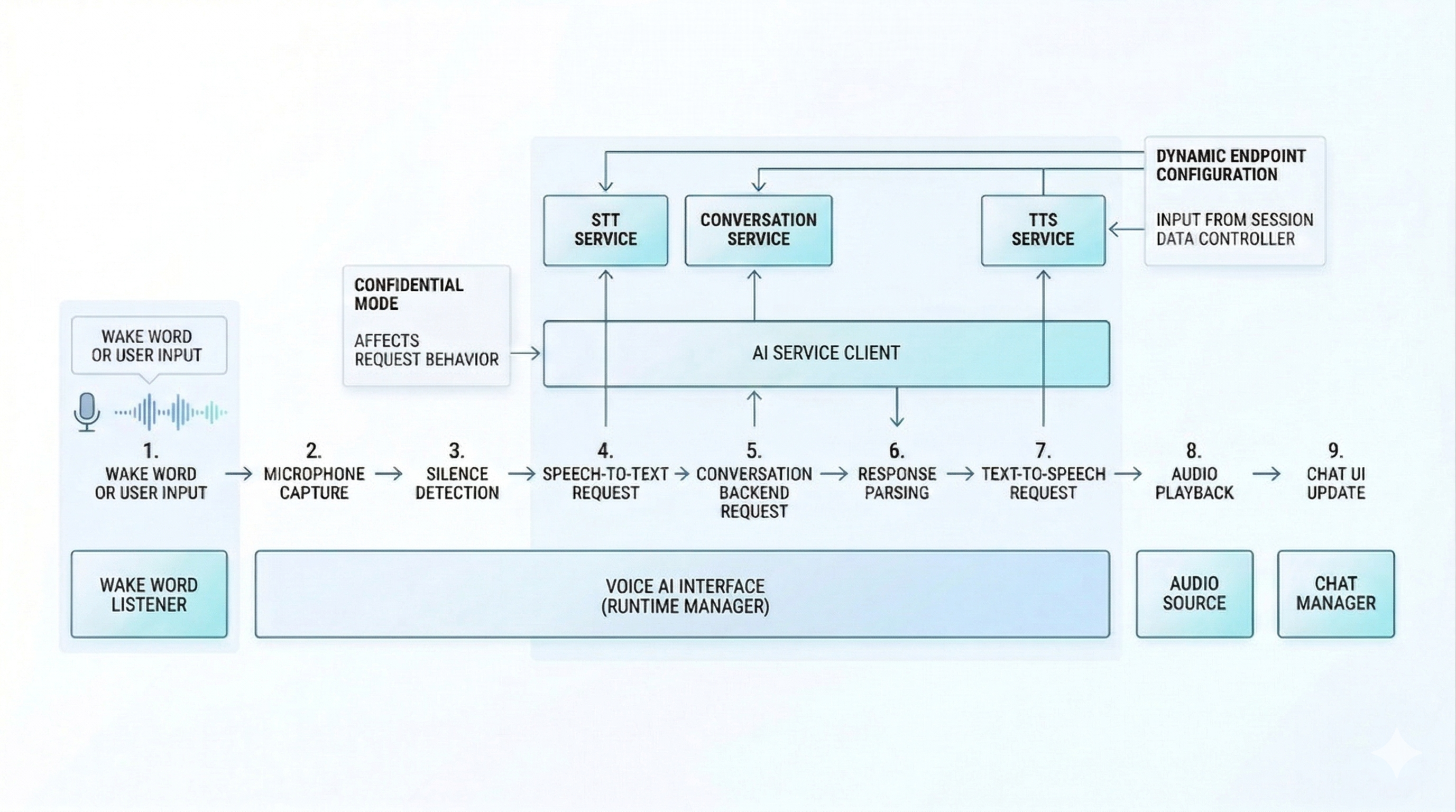
Voice and AI runtime flow covering wake word detection, recording, transcription, conversation calls, chat updates, and TTS playback.
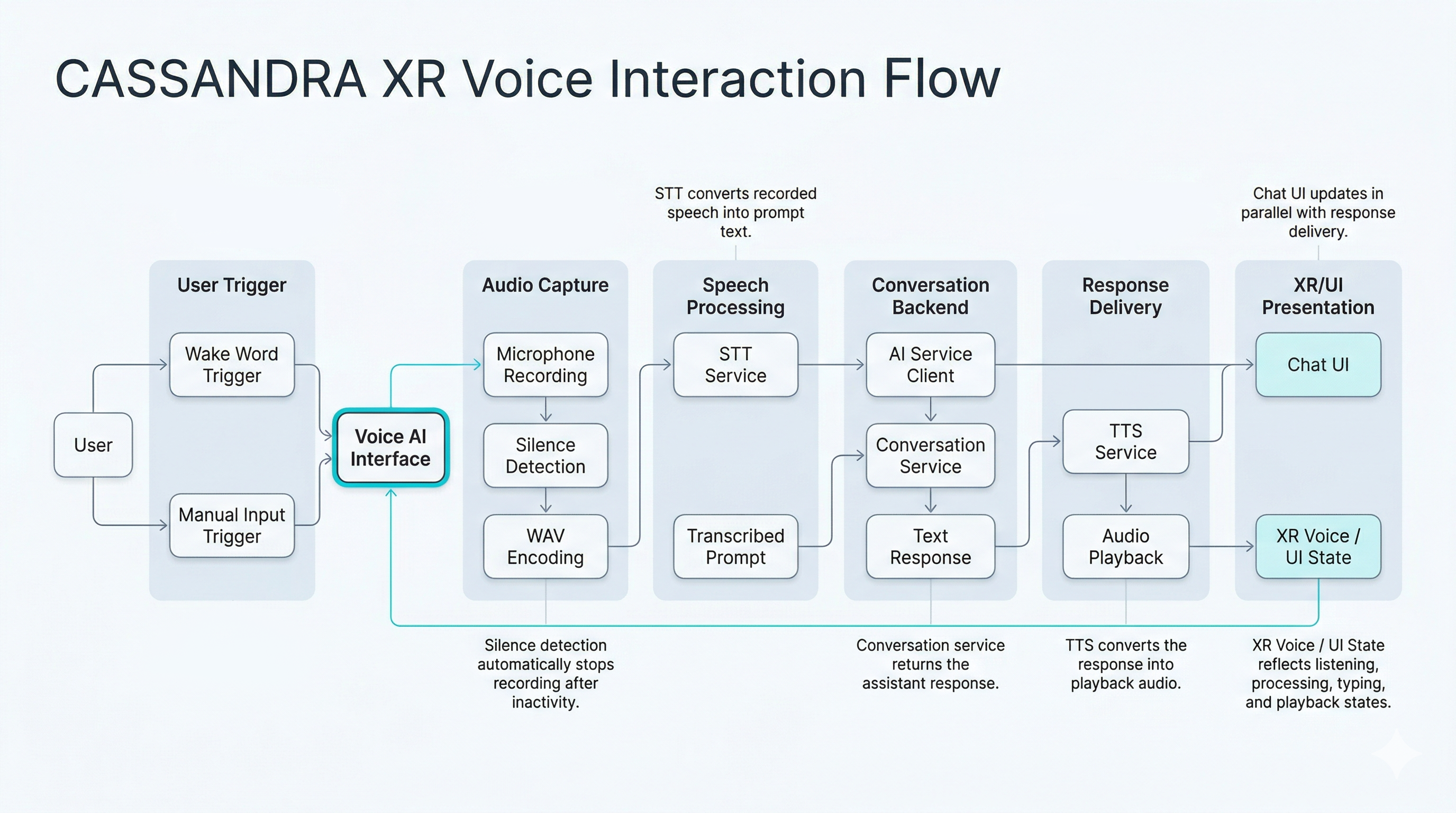
Detailed voice interaction flow from wake word or user input through recording, transcription, conversational processing, audio playback, and chat UI update.
Main Components
Assets/Scripts/Interaction/WakeWord/PorcupineWakeWordListener.csAssets/Scripts/Chatbot/GeminiClient.csAssets/Scripts/Chatbot/GeminiVoiceInterface.csAssets/Scripts/Chatbot/ChatManager.csAssets/Scripts/Chatbot/WavUtility.csAssets/Scripts/UI/Chatbot/MicButtonPulse.csAssets/Scripts/UI/Chatbot/BubbleAppear.cs
Wake Word Layer
PorcupineWakeWordListener:
- Waits for the Picovoice access key from
SessionDataController - Copies the model and keyword assets from
StreamingAssetsinto writable storage - Requests microphone permission on Android
- Starts or pauses Porcupine runtime listening
- Emits
OnWakeWordDetected
GeminiClient
GeminiClient is a small transport wrapper around the conversation endpoint.
Responsibilities:
- Sends prompt payloads to the backend
continueendpoint - Adds optional confidential header
- Implements retry and exponential backoff logic
- Distinguishes retryable transport/server errors from hard failures
GeminiVoiceInterface
GeminiVoiceInterface is the central orchestrator for:
- Dynamic STT/TTS config loading
- Active conversation endpoint updates from
StudyRuntimeSO - Voice button and wake word handling
- Microphone recording lifecycle
- Silence-based auto-stop
- WAV encoding
- STT upload
- Prompt send to Gemini backend
- TTS fetch and audio playback
- Conversation history restore
- Confidential-mode redaction
This class is effectively a mini application controller inside the larger app.
ChatManager
ChatManager owns the immersive chat window state.
Responsibilities:
- Spawns user and assistant bubble prefabs
- Displays "listening" and "typing" placeholders
- Maintains a lightweight in-memory chat history
- Auto-scrolls the scroll view to the latest bubble
Confidential Mode
GeminiVoiceInterface and StudyInfoPanelController both include confidential-mode behaviors.
Current supported behaviors include:
- UI identity redaction
- Prompt and response redaction
- Disabling or suppressing history fetch
- Optional TTS suppression
- Reduced logging
The implementation is pragmatic rather than cryptographically secure. It is a presentation-layer privacy mechanism, not a security boundary.
UI and Metadata Presentation
Main Components
Assets/Scripts/UI/InfoPanel/StudyInfoPanelController.csAssets/Scripts/UI/InfoPanel/StudyInfoPanel.csAssets/Scripts/UI/InfoPanel/FaceUser.csAssets/Scripts/UI/Utiils/CanvasXRSetup.csAssets/Scripts/UI/Utiils/RoundedRectMaterialSync.cs
StudyInfoPanelController
This is the active structured metadata presenter used in MainScene.
Responsibilities:
- Reads the active study from
StudyRuntimeSO - Formats fields for display
- Supports English or French presentation
- Supports full or short date formats
- Supports confidential-mode redaction or hide behavior
- Controls root visibility through a
CanvasGroup
StudyInfoPanel
This class is a more free-form text-based alternative metadata presenter.
It appears to be a legacy or alternate implementation rather than the primary active path in MainScene.
FaceUser and CanvasXRSetup
These helpers support world-space UI behavior:
FaceUserrotates UI toward the current cameraCanvasXRSetupensures a world-space canvas has a camera bound
RoundedRectMaterialSync
This utility keeps a UI material property in sync with RectTransform size.
It is a styling helper used by rounded-rectangle shader-driven UI panels.
Report Viewer
Main Components
Assets/Scripts/UI/Report/PageDisplay.csAssets/Scripts/UI/Report/ReportGrabAndSwipe.cs
PageDisplay
Responsibilities:
- Holds an array of report page textures
- Applies the selected page texture to a renderer
- Supports next/previous navigation
ReportGrabAndSwipe
Responsibilities:
- Hooks into
XRGrabInteractable - Tracks the selecting interactor while grabbed
- Measures swipe displacement on a local plane
- Uses thresholded lateral motion to flip report pages
This is a compact but functional XR-friendly report interaction pattern.
XR Interaction Layer
This subsystem exists in the repository, but not all of it is central to the currently active scene.
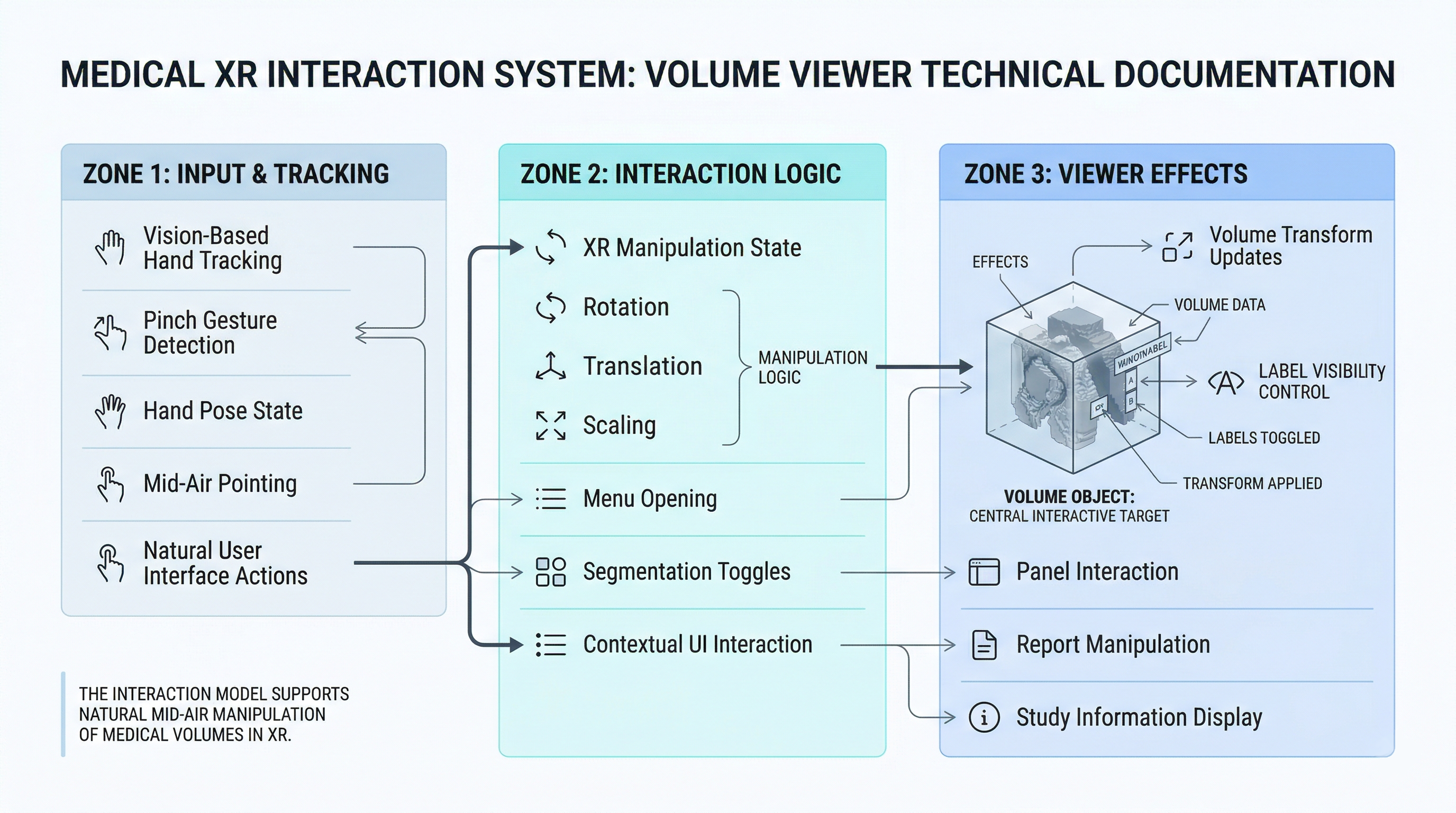
XR interaction layer showing the gesture, manipulation, and UI control paths that connect users to the rendered volume.
Main Components
Assets/Scripts/Interaction/BrainMenuOpenerXRHands.csAssets/Scripts/Interaction/PinchToOpenBrainMenu.csAssets/Scripts/Interaction/HandPinchScaleXRHands.csAssets/Scripts/Interaction/HandPinchRotate.csAssets/Scripts/Interaction/HandFistTranslateXRHands.csAssets/Scripts/Interaction/XRManipulationState.csAssets/Scripts/UI/SegmentBrainMenu/BrainMenuToggleToVolumeDVR.csAssets/Scripts/UI/SegmentBrainMenu/XRMenuIntemInteractable.cs
Functional Purpose
These scripts provide:
- pinch-driven scaling
- single-hand rotation
- fist-based translation
- menu opening gestures
- segmentation visibility UI
Architectural Note
Most of this subsystem is prefab-oriented and reusable, but it is not the dominant control path in MainScene.
It appears to represent either:
- a partially integrated feature set
- an alternate interaction mode
- an in-progress or experimental XR-first manipulation layer
BrainMenuToggleToVolumeDVR
This is the bridge between segmentation UI and the renderer.
Responsibilities:
- Reads
volumeDVR.labelInfos - Builds toggle entries in a scrollable UI
- Maps toggle states to label indices
- Calls
VolumeDVR.SetLabelVisible()
This is a good example of a feature-specific adapter around renderer state.