Rendering Pipeline
This page describes how CASSANDRA XR turns a cached .vrdf file into a rendered interactive medical volume.
Scope
The rendering path documented here covers:
- file selection by modality
- VRDF decoding
Texture3Dand LUT construction- material binding
- shader selection
- runtime label control
- scale and reload behavior
The main implementation lives in:
Assets/Scripts/DVR/VolumeDVR.csAssets/Scripts/VRDF/VolumeVRDFLoader.csAssets/Shaders/VolumeDVR_URP.shaderAssets/Shaders/VolumeDVR_URP_Quest.shader
Render Pipeline Overview
At a high level, the viewer-side rendering pipeline follows these stages:
SessionDataControllerselects the active modalityVolumeDVR.LoadVolumeByCodeAsync(code)resolves the source file from cache orStreamingAssetsVRDFLoader.LoadFromFile(path)parses the.vrdfcontainerVRDFLoader.BuildUnityTextures(data)creates the runtime textures and LUT inputsVolumeDVR.ApplyAfterLoad()binds textures, control state, and metadata to the material- The active URP shader raymarches the volume into the final XR output
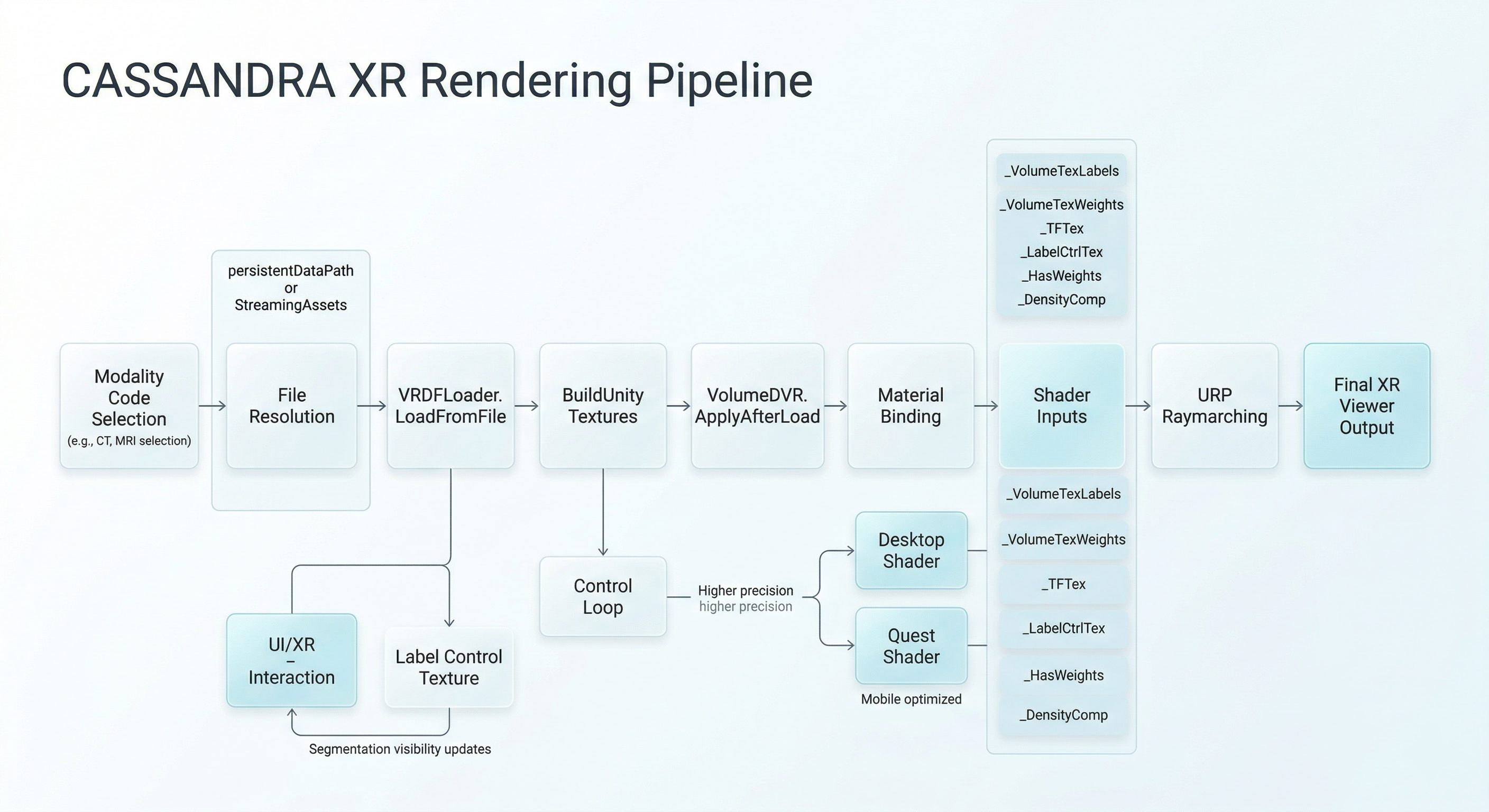
High-level rendering pipeline from cached VRDF selection through decode, material binding, and final XR volume rendering.
Volume Selection
VolumeDVR.LoadVolumeByCodeAsync() is the entry point used by startup and modality-switch flows.
The method:
- normalizes the modality code
- first tries the strict filename pattern
{code}_lw.vrdf - checks
Application.persistentDataPath - falls back to
StreamingAssets - scans
.vrdffiles by code substring if the strict path fails
That means the render pipeline is not only a graphics concern. It depends directly on study asset naming and on the cache state prepared by the orchestration layer.
Decode Stage
Once a file is resolved, InternalLoadFused() performs the viewer-side decode path:
- clean up textures from the previous load
- parse the file via
VRDFLoader.LoadFromFile() - build Unity textures via
VRDFLoader.BuildUnityTextures() - cache references for labels, weights, and transfer-function textures
The renderer does not stream blocks incrementally. Each load reconstructs a new in-memory representation and a new set of textures.
Material Binding
ApplyAfterLoad() is the point where decoded data becomes active viewer state.
The method calls:
ApplyToMaterial()InitLabelCtrlTexture()BuildLabelInfosFromData()FitVolumeScaleFromSpacing()
Together, those steps bind the render inputs, initialize segmentation control state, build UI metadata, and scale the object in world space.
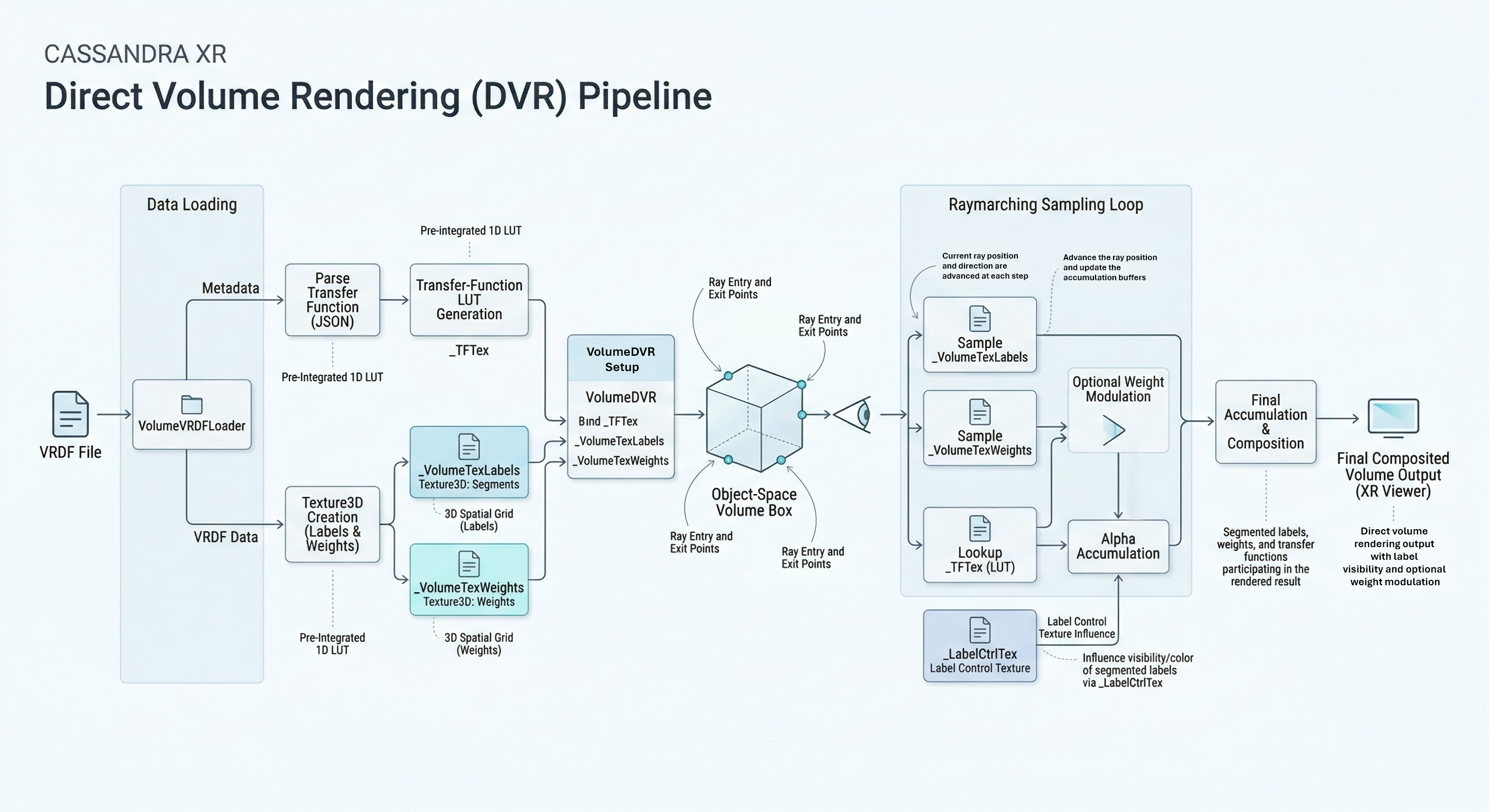
Direct volume rendering path inside the viewer, from decoded texture inputs to material state and render-time control surfaces.
Main Shader Inputs
The active material receives a small set of core textures and flags.
Important texture bindings include:
_VolumeTexLabels_VolumeTexWeights_TFTex_LabelCtrlTex
Important control values include:
_HasWeights_ScaleCompensation_ScaleMax_DensityComp
The exact visual result depends on the shader variant and the data mode, but the material contract stays centered around those properties.
Label Control Texture
Segmentation visibility and per-label adjustments are handled through a dedicated 2D control texture:
_LabelCtrlTex
The runtime creates a 256 x 1 texture where each pixel corresponds to a label index.
The stored RGBA channels act as runtime control values:
- RGB can be used as tint
- alpha acts as the effective visibility or opacity control
This is the main bridge between the render system and the UI layer. Menus do not rebuild the volume; they update a small control texture instead.
Runtime Label Metadata
BuildLabelInfosFromData() extracts a UI-friendly runtime model from the transfer-function data.
Each VolumeLabelInfoRuntime includes:
- label index
- display name
- default color
- default visible state
This is what allows systems such as segmentation toggles to expose render controls without having to understand VRDF parsing directly.
World-Space Scaling
FitVolumeScaleFromSpacing() derives the rendered object scale from:
- volume dimensions
- voxel spacing in millimeters
The resulting object scale is converted to meters and applied as transform.localScale.
The renderer then uses LateUpdate() to derive scale-aware density compensation values for the shader, so object resizing and physical spacing remain linked.
Shader Selection
SelectShaderForPlatform() switches the material shader depending on the target:
- desktop/editor:
Custom/VolumeDVR_URP - Quest/Android:
Volume/VolumeDVR_URP_Quest
This is a hard branch in the current design. The project does not use one unified shader with minor runtime toggles. Instead, it keeps a dedicated Quest-oriented path.
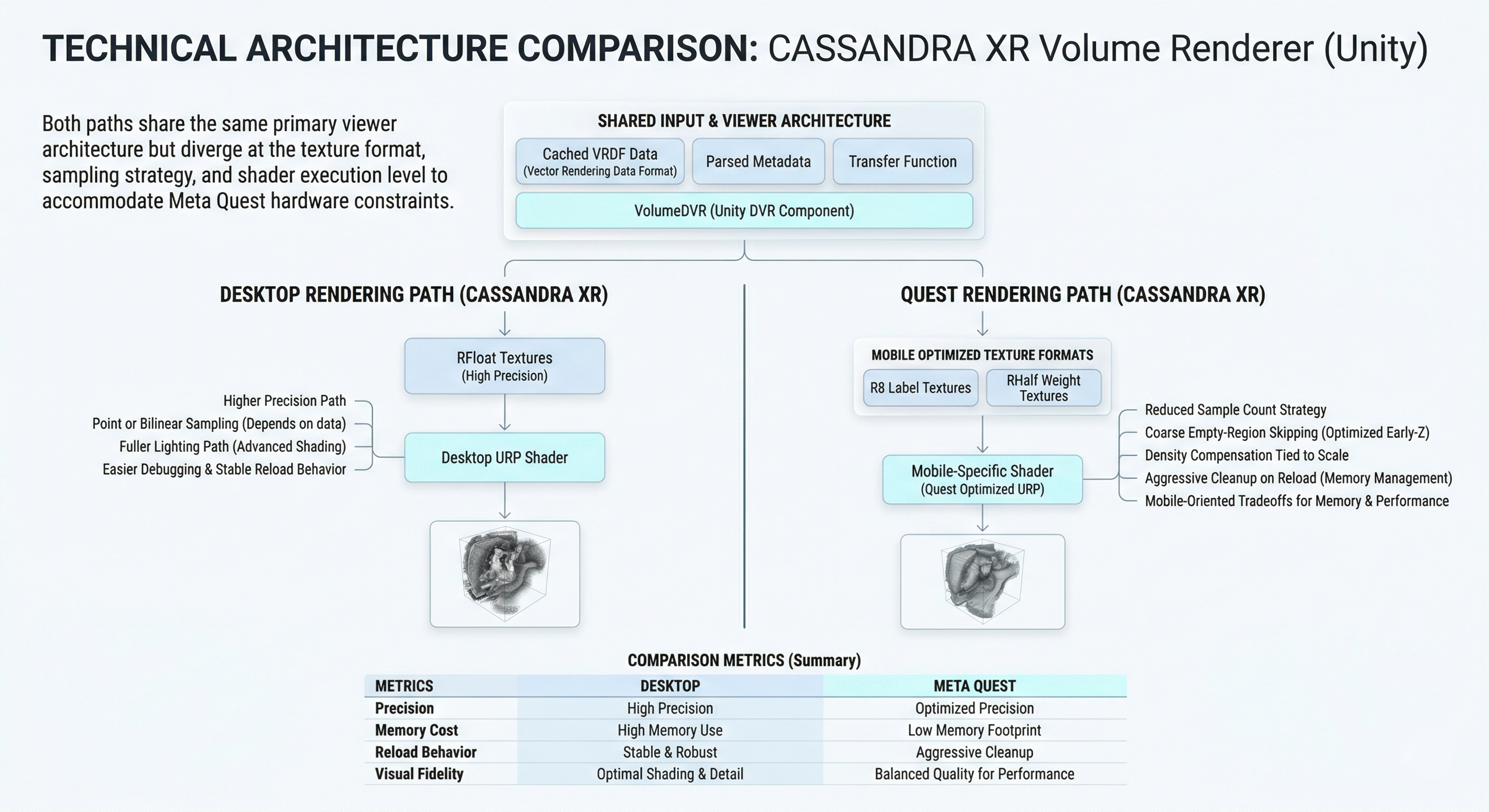
Comparison of the desktop and Quest rendering split, highlighting the platform-specific shader and resource tradeoffs in the current pipeline.
Desktop Shader Path
Assets/Shaders/VolumeDVR_URP.shader is the higher-fidelity desktop path.
The architecture described by the code and current docs is:
- transparent raymarch pass
- object-space box intersection
- label or continuous transfer-function sampling
- optional weight-volume participation
- gradient-like lighting estimation
This path is the easier one to inspect and reason about during development.
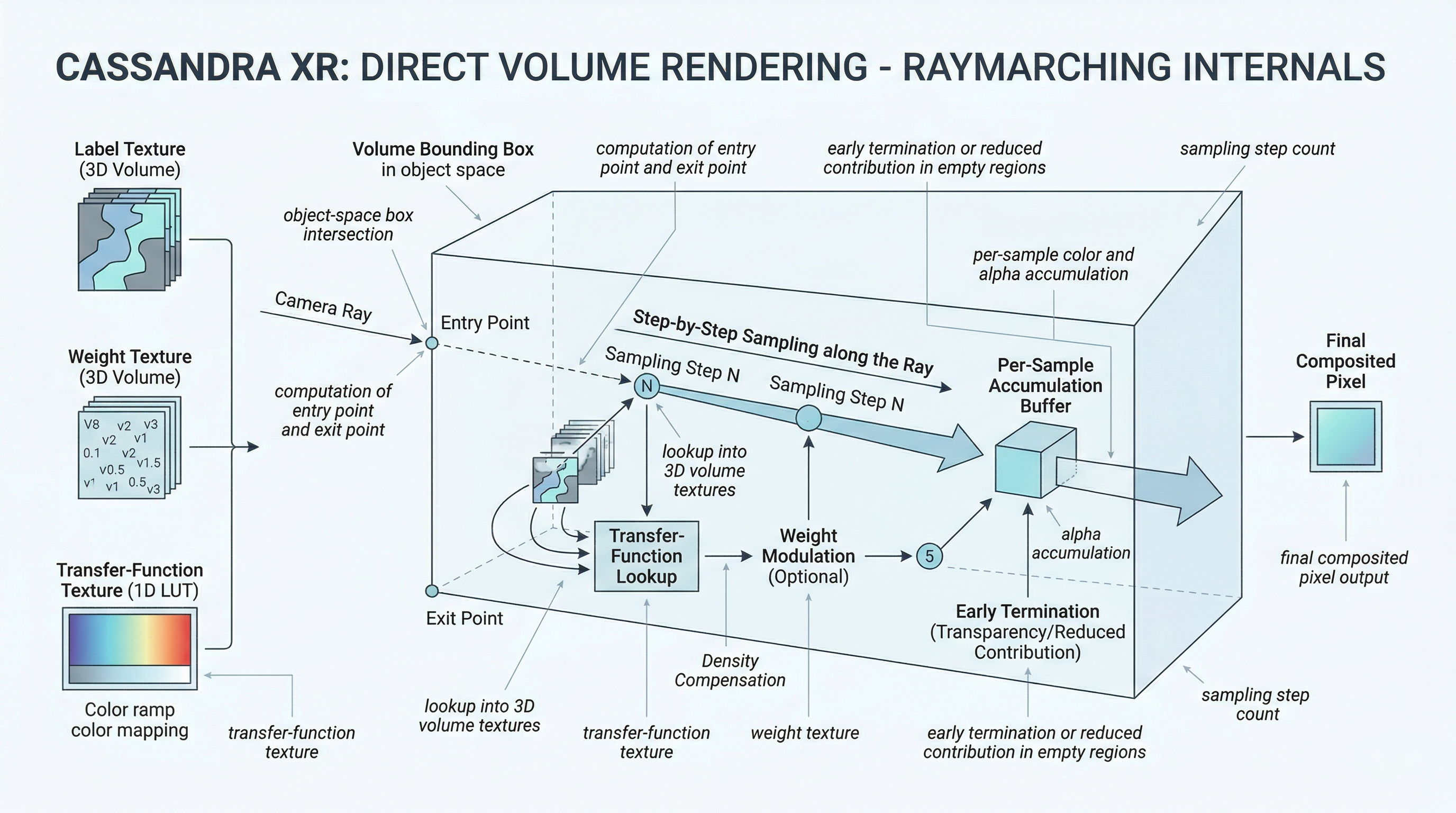
Raymarching internals used by the volume shaders, including sampling, transfer-function lookup, and lighting accumulation through the active volume.
Quest Shader Path
Assets/Shaders/VolumeDVR_URP_Quest.shader is the mobile-oriented path.
It is designed around:
- reduced sampling cost
- lower-precision texture formats
- coarse skip behavior in empty regions
- scale-aware density compensation
This is the practical reason the application can target Quest at all, but it also explains why reload and quality tradeoffs are more visible on that platform.
Resource Lifecycle And Reloads
Before a new volume is loaded, CleanupPreviousTextures():
- unbinds current textures from the material
- replaces them with fallback black textures
- destroys old
Texture3DandTexture2Dobjects - recreates label control state
On Android, it also calls:
Resources.UnloadUnusedAssets()GC.Collect()
This makes the reload path safer in low-memory situations, but it also contributes to visible hitches when switching modalities.
Rendering Constraints
The current render pipeline is effective, but it has clear constraints:
- CPU-side decode and unpack before GPU upload
- full texture reconstruction on reload
- no partial streaming or bricking
- no persistent texture pooling between modality swaps
- platform-specific shader duplication
These are reasonable prototype choices, but they define the current performance envelope.
Technical Lineage
The renderer currently shipped in CASSANDRA XR is the direct volume-rendering path implemented in this repository.
Related public context:
- VRDF SDK
- documents the data format and reference runtime assumptions around
.vrdf
- documents the data format and reference runtime assumptions around
- HybridMedRenderer
- provides useful lineage context for earlier hybrid surface-plus-volume rendering experiments
The current project, however, is documented around the concrete viewer runtime in VolumeDVR and the URP shaders listed above.