Backend Integration and Contracts
This page documents the boundary between the Unity XR client and the external services it depends on.
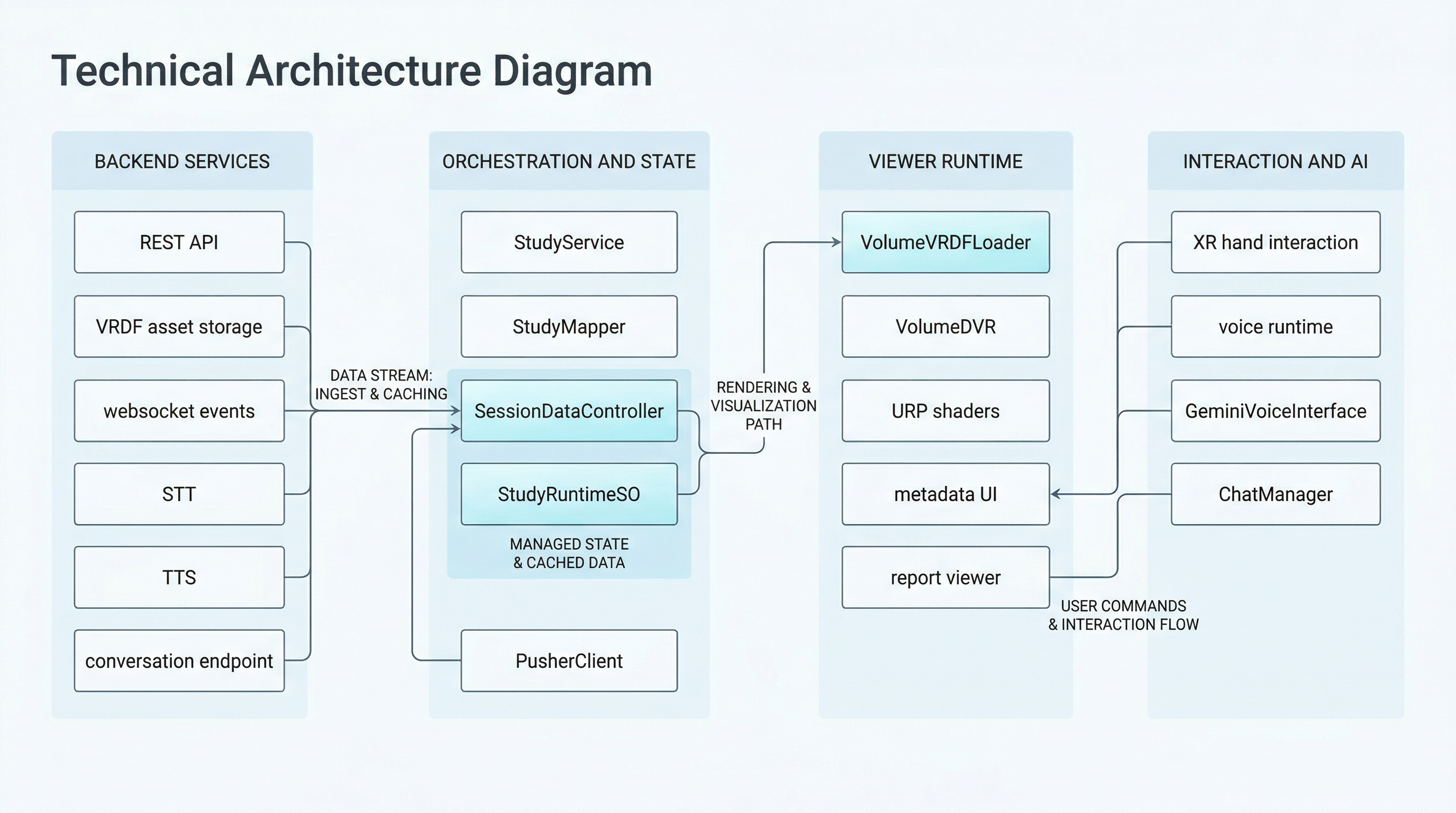
Backend-facing context for the XR client, showing how REST, websocket, and study-scoped AI endpoints feed the runtime orchestration path.
It focuses on the contracts visible in this repository:
- REST study payloads
- downloaded volume assets
- websocket events
- dynamic STT and TTS endpoints
- study-scoped conversation endpoint usage
Scope
The backend logic itself is not implemented in this repository.
What the XR client does define is:
- how study payloads are deserialized
- which fields are required to populate runtime state
- how volume assets are recognized
- which websocket payloads trigger reload behavior
The main classes for this boundary are:
Assets/Scripts/API/Ochestrator/StudyService.csAssets/Scripts/API/DataContract/JsonFormatUtility.csAssets/Scripts/API/DataContract/StudyMapper.csAssets/Scripts/API/Ochestrator/SessionDataController.csAssets/Scripts/API/Websocket/PusherClient.csAssets/Scripts/API/StudyRuntimeSO.csAssets/Scripts/Chatbot/GeminiClient.cs
REST Entry Point
The current study fetch path starts with StudyService.
The configured REST endpoint is:
https://holonauts.fr/active
StudyService.FetchStudies():
- performs an HTTP GET
- uses
CertsHandler - deserializes the JSON response into
RootResponse - maps each backend study through
StudyMapper
REST Payload Shape
The repository-side transport contract is defined in JsonFormatUtility.cs.
RootResponse
The top-level payload currently expects:
successdatacountpicovoice_keystt_keytts_key
In the current client, picovoice_key, stt_key, and tts_key are treated as dynamic runtime configuration values rather than static build configuration.
StudyRaw
Each study item currently expects:
idtitlecodepatient_idstatusstudy_dateis_vrconversation_urlassetspatient
AssetRaw
Each asset entry currently expects:
idfilenameasset_typedownload_url
PatientRaw
The embedded patient structure currently expects:
idfirst_namelast_namedate_of_birthgender
Study Mapping Contract
The client does not expose backend DTOs directly to the rest of the runtime.
StudyMapper.Map() translates StudyRaw into StudyForUnity, including:
- study identity fields
- patient information
conversation_url- a filtered list of
VrdfAssetentries
This is the main point where backend naming conventions are normalized into viewer-facing assumptions.
VRDF Asset Recognition Rules
StudyMapper only keeps assets that look like volume files according to two checks:
- filename ends with
.vrdf asset_typeends with_vrdf
If both checks do not pass, the asset is ignored by the viewer-side volume pipeline.
The derived modality name then comes from:
- the
asset_typeprefix before_vrdf, or - the filename suffix before
_...
This means the backend and client currently share an implicit convention around asset_type and filename structure.
Runtime State Contract
After mapping, SessionDataController applies the selected study into StudyRuntimeSO.
The runtime state currently stores:
- study id
- title
- code
- study date
isVrconverationURL- patient data
- the list of
VrdfAsset
This object is then read by UI, render, and voice systems.
Download Contract
Once studies are fetched, SessionDataController downloads every VrdfAsset.downloadUrl into the cache path.
Important implementation details:
- destination is
Application.persistentDataPathunless overridden - files are written through a temporary
.partpath - existing files are reused
- progress is emitted as scene-level events
The volume renderer therefore depends on local file availability, not direct in-memory asset streaming from HTTP.
WebSocket Contract
Real-time session changes arrive through PusherClient.
The current websocket URL is:
ws://holonauts.fr:2025/app/9weqrk5tbh6jukkrngvb?protocol=7&client=js&version=8.2.0&flash=false
The current channel is:
vr-status
The client handles Pusher-style frames and reacts specifically to:
pusher:connection_establishedpusher_internal:subscription_succeededvr.status.changedpusher:error
vr.status.changed Payload
The websocket payload shape currently expected by the XR client is represented by PusherClient.VrStatusPayload.
The fields are:
study_idstudy_codestudy_titlepatient_nameis_vractiontimestampmessage
Only part of this payload is used to drive runtime behavior today. The key fields for reload decisions are study_code and is_vr.
Reload Behavior
SessionDataController subscribes to PusherClient.OnVrStatusChanged.
When it detects a relevant change:
- it clears
StudyRuntimeSO - it emits
OnReloadRequested
The rest of the scene is then expected to restart the load pipeline.
This means websocket events are not directly mutating the scene graph. They are used as a trigger into the same orchestration path used by normal startup.
Voice And AI Endpoint Contracts
The voice and conversation stack uses multiple backend-facing endpoints.
Dynamic Runtime Config
From the REST root payload:
picovoice_keybecomesSessionDataController.PicovoiceAccessKeystt_keybecomesSessionDataController.SttUrltts_keybecomesSessionDataController.TtsUrl
These values are published once fetched and can be consumed by dependent runtime systems.
Conversation Endpoint
The per-study conversation endpoint comes from:
StudyRaw.conversation_url
This is copied into:
StudyForUnity.converationURLStudyRuntimeSO.converationURL
GeminiClient then uses a provided endpoint to POST JSON requests with a question field.
Practical Contract Assumptions
The Unity client currently assumes:
- the
/activeendpoint returns at least one valid study - study assets follow the VRDF naming rules expected by
StudyMapperandVolumeDVR - the backend delivers Picovoice, STT, and TTS endpoints through the root study payload
- websocket payloads can be parsed as Pusher frames plus
VrStatusPayload - the study conversation endpoint is valid for POST-based prompt continuation
If any of those assumptions change, the breakage will usually show up first in StudyMapper, SessionDataController, or PusherClient.
Security Note
This page documents the current integration contract, not a production-ready security posture.
The present implementation still includes:
- permissive certificate handling
- plain
ws://websocket transport - Android cleartext allowance
Those details are covered more fully in Platform, Build, and Security.